
Download Free Window Registry Repair – registry repair, system optimization, Windows performance, PC stability, free registry fix, optimize Windows
Overview
Free Window Registry Repair is a dedicated system utility designed to enhance the stability and performance of Windows operating systems. The Windows registry serves as a critical database that stores configuration settings for the OS, installed applications, and hardware components. Over time, improper software installations, system crashes, or outdated entries can lead to registry corruption, which may manifest as system slowdowns, application errors, or unexpected crashes.
This tool aims to address these issues by identifying and repairing registry anomalies. Its primary purpose is to restore system integrity through targeted optimization, helping users maintain a responsive and reliable computing environment. The app is intended for individuals and IT professionals seeking a straightforward solution to improve PC performance without relying on complex technical knowledge.
While the developer did not provide additional background details, the application’s focus on core system maintenance aligns with the needs of users experiencing gradual performance degradation. Real-world use cases include troubleshooting sluggish systems, resolving software conflicts, and preparing computers for intensive tasks. In the broader context of system utilities, Free Window Registry Repair fills a niche for lightweight, no-cost tools that support long-term system health.
Key Features & Functionality
- Enhanced System Stability and Performance: By correcting invalid registry entries, the tool reduces system strain and prevents erratic behavior. Users may notice fewer crashes and faster application launches after repairs.
- Comprehensive Registry Scanning and Repair: The software performs a full scan of the registry, detecting inconsistencies, broken links, and obsolete entries. This thorough analysis ensures that no critical issues are overlooked during optimization.
- Automatic Backup and Restore Functionality: Before applying any changes, the app creates a backup of the current registry state. This safeguard allows users to revert to the original configuration if unexpected issues arise after repair.
- User-Friendly Interface and Efficient Operation: Designed for accessibility, the interface enables users to initiate scans and repairs with minimal effort. Even non-technical users can navigate the tool effectively through intuitive controls.
- Regular Maintenance for Optimal Performance: The tool encourages consistent use to prevent the accumulation of registry issues. Scheduled or periodic repairs can help sustain peak system performance over time.
These features collectively support users in maintaining a healthy Windows environment. For example, a user experiencing slow boot times may benefit from a full registry scan to eliminate outdated startup entries. Similarly, someone encountering application errors after software updates can use the repair function to resolve registry-related conflicts. The integration of backup and restore functionality adds a layer of safety, making the tool suitable for both novice and experienced users.
Interface, UX & Performance
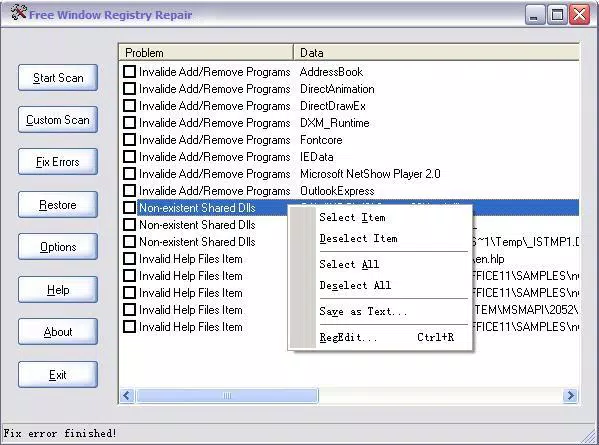
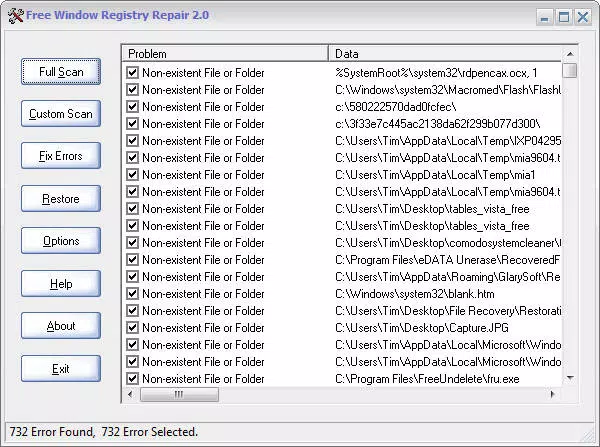
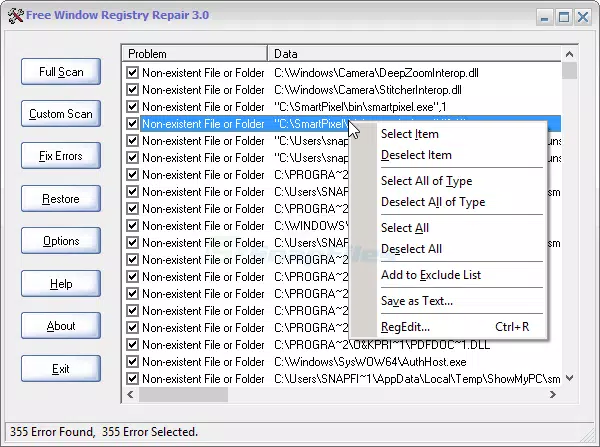
The user interface of Free Window Registry Repair is designed with simplicity and clarity in mind. Navigation is streamlined, allowing users to initiate scans and view results without confusion. Visual cues and progress indicators provide real-time feedback during operations, enhancing the overall user experience.
The layout avoids clutter, focusing on essential actions such as scan initiation, repair execution, and backup management. Although the developer did not list formal performance metrics, the application’s lightweight size of 2.5 MB suggests efficient resource usage. It is expected to operate smoothly on a range of Windows systems, including those with limited processing power or memory.
Responsiveness appears to be consistent, with minimal lag during scanning and repair processes. Stability is likely maintained through the inclusion of backup safeguards, reducing the risk of system instability post-repair. The tool does not appear to require extensive permissions or background services, which contributes to a low-impact footprint.
While specific device compatibility details were not disclosed, its small size and targeted function indicate broad usability across standard Windows platforms.
Platform Compatibility & Technical Requirements
Free Window Registry Repair is designed for the Windows platform. The application is available in version 1.0.0 and has a file size of 2.5 MB, indicating a lightweight installation. The developer did not specify minimum OS requirements or compatibility with specific Windows versions.
As such, users should verify system compatibility before installation. No additional hardware or software dependencies were mentioned. The absence of detailed technical specifications means that users must rely on general Windows system compatibility.
It is recommended to ensure the operating system is up to date before running the tool. While the app is free to download and use, users should always exercise caution when modifying system-level components like the registry. The developer did not provide information on automatic update mechanisms or future release schedules.
Pros and Cons
Pros
- Free to download and use, making it accessible for budget-conscious users.
- Lightweight size of 2.5 MB ensures minimal storage impact.
- Includes automatic backup for safe repair operations.
- User-friendly interface suitable for non-technical users.
- Designed for regular maintenance to prevent long-term performance decline.
Cons
- Specific OS compatibility requirements were not disclosed.
- No information on update frequency or future development plans.
- Developer background and support details were not provided.
- Performance benchmarks or usage statistics were not shared.
- May not address all system performance issues beyond registry-related problems.
FAQ
Is Free Window Registry Repair safe to use?
The tool includes an automatic backup feature, which allows users to restore the registry if needed. This safety mechanism reduces the risk of permanent system damage. However, users should only run trusted versions of the software.
Can I use this tool on older Windows systems?
The developer did not specify which Windows versions are supported. Users should check system compatibility before installation.
Does Free Window Registry Repair require admin rights?
Since it modifies the Windows registry, the tool likely requires elevated privileges. Users may need to run it as an administrator for full functionality.
How often should I run the registry repair?
Regular maintenance is recommended. Users may benefit from running the tool monthly or after major system changes to prevent performance degradation.
Is there a mobile version of this app?
Free Window Registry Repair is designed for Windows desktop systems. There is no mobile version available for Android or iOS devices.
Final Thoughts
Free Window Registry Repair presents a focused and accessible solution for users seeking to maintain their Windows system’s health. Its core strengths lie in its simplicity, safety features, and emphasis on regular maintenance. While technical details are limited, the tool’s lightweight design and built-in backup functionality make it a low-risk option for improving system stability.
It is particularly beneficial for individuals who lack advanced technical expertise but want to take proactive steps in optimizing their PC. For those experiencing performance slowdowns or recurring system errors, this utility offers a practical first step toward resolution. The free price point enhances its value proposition, especially when compared to commercial alternatives.
Though it does not claim to solve all performance issues, it addresses a critical component of system reliability. By targeting registry integrity, it supports long-term usability and efficiency. Download Free Window Registry Repair now to keep your Windows system running smoothly and reliably.


